Django Tutorial | Not a Movie, but a Python Framework to Create Websites
A beginner tutorial to understand how Django works with the Model View Template (MVT) procedure

See the code of the tutorial in this GitHub repo.
Set up your Machine
What do I need to start a
Djangoproject?
- It is recommended that you create a new environment
- And that you have
Anacondainstalled. If not, click here to download & install You need to install the library in your
terminal(use Anaconda Prompt for Windows Users):conda create -n django_env django conda activate django_env
Start the Django Project
Ok, you got it. What's next?
- Open a Code Editor application to start working more comfortable with the project
- I use Visual Studio Code (aka VSCode), you may download & install it here
What should I do within VSCode?
- You will use the
Django CLIinstalled with theDjangopackage already - To create the standard folders and files you need for the application
Type the following line within the
terminal:django-admin startproject shop
What should I see on my computer after this?
- If you open your
user folder, you will see that - A folder
shophas been created drag & dropit to VSCode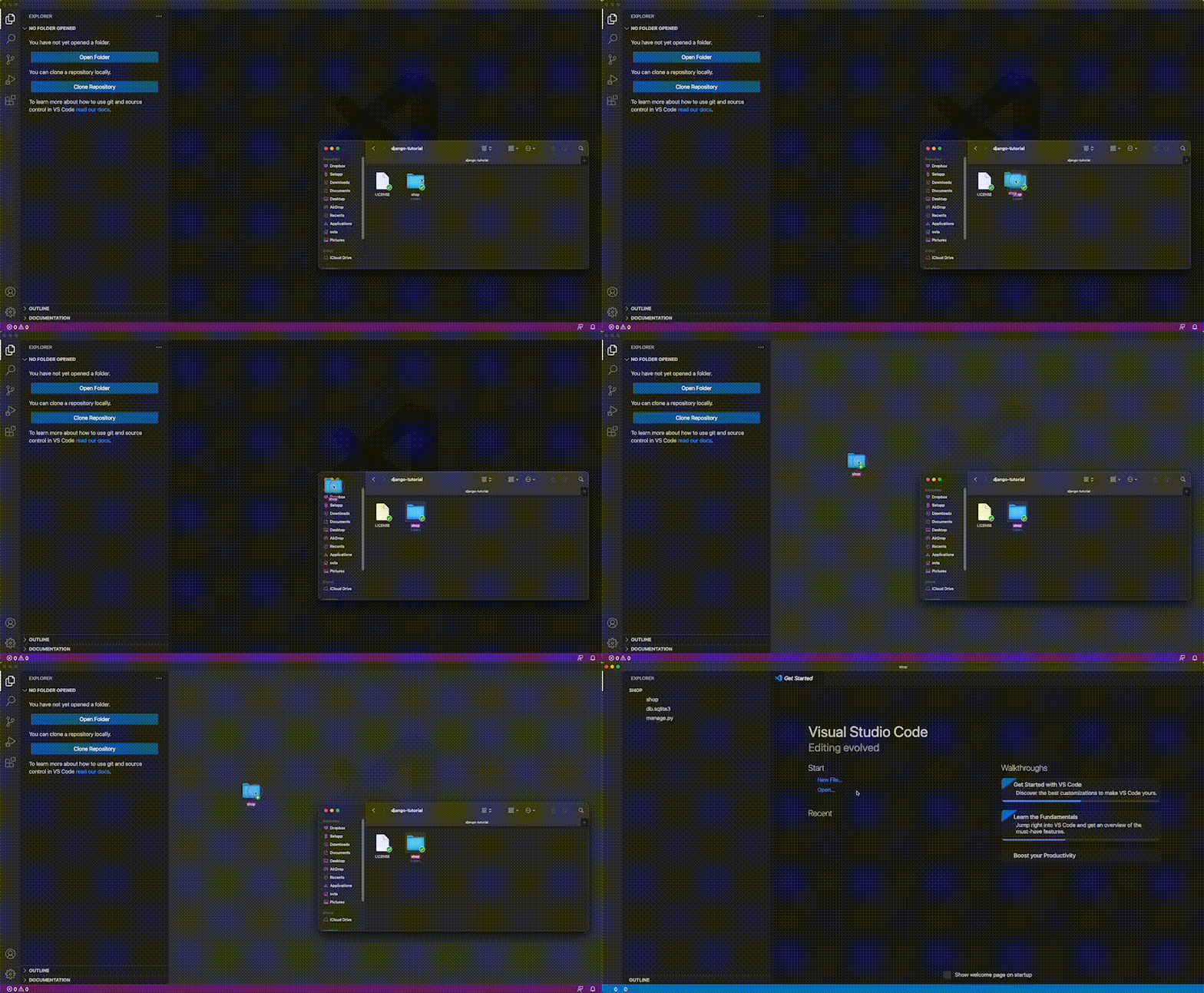
- Now check the folder structure and familiarize yourself with the files & folders
- The folder structure should look like this ↓
- shop/
    - manage.py
    - shop/
        - __init__.py
        - settings.py
        - urls.py
        - asgi.py
        - wsgi.py
Do I need to study all of them?
- No, just go with the flow, and you'll get to understand everything at the end

See the Default Django Website
Ok, what's the next step?
- You'll probably want to see your Django App up and running, right?
- Then, go over the
terminaland write the following ↓
cd shop
python manage.py runserver
- A local server has opened in http://127.0.0.1:8000/, open it in a
web browser - Which references the
localhostand you should see something like this ↓
What if I try another
URLlike http://127.0.0.1:8000/products?
- You will receive an error because
- You didn't tell Django what to do when you go to http://127.0.0.1:8000/products
How can I tell that to Django?
Create an App within the shop Django Project
With the following line of code ↓
python manage.py startup products
The URL
- Create an URL within the file
shop > urls.py
from django.contrib import admin
from django.urls import path, include # modified


urlpatterns = [
    path('products/', include('products.urls')), # added
    path('admin/', admin.site.urls),
]
The View
Create a
View(HTML Code) to be recognised when you go to theURLhttp://127.0.0.1:8000/productsWithin the file
shop > products > views.py
from django.http import HttpResponse


def view_for_products(request):
    return HttpResponse("This function will render `HTML` code that makes you see this <p style='color: red'>text in red</p>.")
See this tutorial if you want to know a bit more about
HTMLCall the function
view_for_productswhen you click on http://127.0.0.1:8000/productsYou need to create the file
urls.pywithin products →shop > products > urls.py
from django.urls import path
from . import views

urlpatterns = [
    path('', views.view_for_products, name='index'),
]
Connecting Project URLs with App URLs
Why do we reference the
URLsin two files? One inshop/urls.pyfolder and the other inproducts/urls.py?
- It is a best practice to have a
Djangoproject separated by differentApps - In this case, we created the
productsApp - In our the file
shop/urls.py, you reference theproducts.pyURLs here ↓
urlpatterns = [
    path('products/', include('products.urls')), #here
    path('admin/', admin.site.urls),
]
- So that at the time you navigate to
https://127.0.0.1:8000/products - You will have access to the URLs defined in
shop/products/urls.py - For example, let's create another View in
shop/products/views.py↓
def new_view(request):
    return HttpResponse('This is the <strong>new view</strong>')
- And reference it in the file
shop/products/urls.py
from django.urls import path
from . import views

urlpatterns = [
    path('', views.view_for_products, name='index'),
    path('pepa', views.new_view, name='pepa'), # new url
]
- We don't need to reference the View in
shop/urls.pysince - we can access all URLs in
shop/products/urls.pyat the time we wrote include('products.urls')in the fileshop/urls.py- Try to go to https://127.0.0.1:8000/products/pepa
Summary
So, each time I want to create a different
HTML, do I need to create a View?
Yes, it's how the Model View Template (MVT) works ↓
You introduce an
URL- The
URLactivates aView - And
HTMLcode gets rendered in the website
Why don't you mention anything about the
model?
- Well, that's something to cover in the following article 🔥 COMING SOON!
Any doubts?
Let me know in the comments; I'd be happy to help!
About the author
I coach people to develop the Resolving Discipline that turns them into independent programmers.
Comments
Join the discussionNo comments yet. Be the first to comment.
Web Apps
This series will show you how to develop web applications using Python libraries such as Flask and Django.